Skip to main content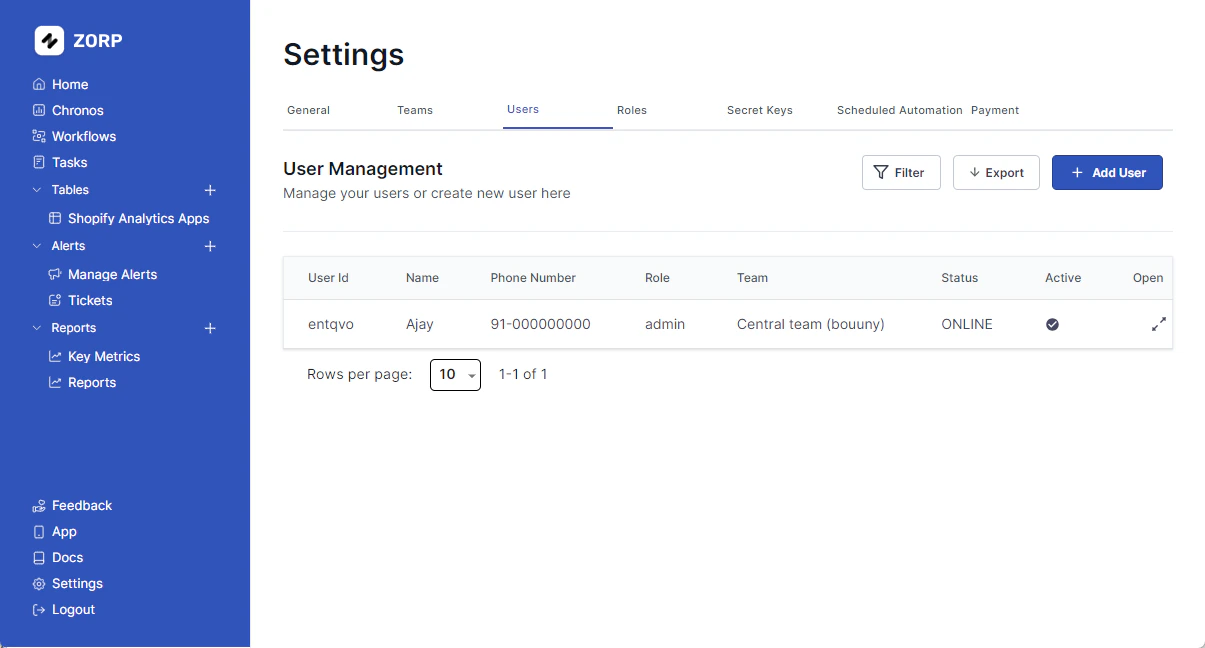 ERPLite provides a user management system that allows you to manage users and their relations to roles and teams within ERPLite. This system is used to authenticate users and authorize them to access the services provided by ERPLite.
Adding a User
To add a new user, click on the Settings tab on the left sidebar
- Click on the
Users tab
- Click on the
Add User button.
- Fill in the user details.
- Click on the
Create User button.
Editing a User
To edit a user, head over to the Settings tab on the left sidebar
- Click on the
Users tab
- Open on the user you want to edit
- Click on the
Edit button
- Edit the user details
- Click on the
Update User button
Deleting a User
To delete a user, click on the settings tab on the left sidebar
- Click on the
Users tab
- Open on the user you want to delete
- Click on the
Delete button
- Confirm the deletion
Changing a Users Password
Firstly, head over to the Settings tab on the left sidebar. Then continue following these steps:
- Click on the
Users tab.
- Open on the user whose password you want to edit.
- Click on
Change Password button.
- Type & Re-type the new password.
- Hit
Change Password button.
Cool Add Ons
Your team is 1000+? No worries! Apply Filter and save time.
You can also Export your user list. Just saying. 
